C# dotnet 6.0 Dictionary コピーを作る

C# dotnet Dictionary copy

Microsoft C# .NET6.0で、 Dictionary 変数のコピーを作る方法。

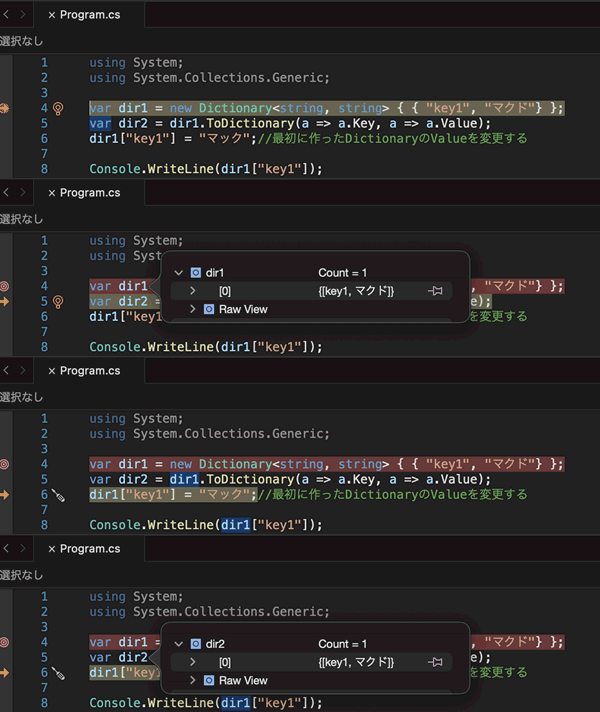
イコールで コピーした場合、 実態は コピーされません。

newで Dictionary 変数のコピーを作る

using System;
using System.Collections.Generic;

var dir1 = new Dictionary<string, string> { { "key1", "マクド"} };
var dir2 = new Dictionary<string, string>(dir1); //new でコピーする
dir1["key1"] = "マック";//最初に作ったDictionaryのValueを変更する

Console.WriteLine(dir1["key1"]);
Console.WriteLine(dir2["key1"]); //dir1とdir2の中身の違いを確認

Enumerable.ToDictionaryを使った Dictionaryのコピー

using System;
using System.Collections.Generic;

var dir1 = new Dictionary<string, string> { { "key1", "マクド"} };
var dir2 = dir1.ToDictionary(a => a.Key, a => a.Value); 
dir1["key1"] = "マック";//最初に作ったDictionaryのValueを変更する

ToDictionary は 万能です

ToDictionaryList<string>を Dictionary<string, string>にも変換できます。

var array1 = new List<string>{"1,東京","2,大阪"};
var newDic = array1.ToDictionary(a => a.Split(",")[0], a => a.Split(",")[1]);
C# dotnet 6.0 List リストの連結

c# dotnet list AddRange

Microsoft dotnet 6.0 で、 2つの List<T>を 連結させる場合のコード例です。

using System;
using System.Collections.Generic;
var list1 = new List<string>{"難波","日本橋","鶴橋"};
var list2 = new List<string>{"今里","布施","永和"};
list1.AddRange(list2);
foreach(var s in list1){
    Console.WriteLine(s);
}

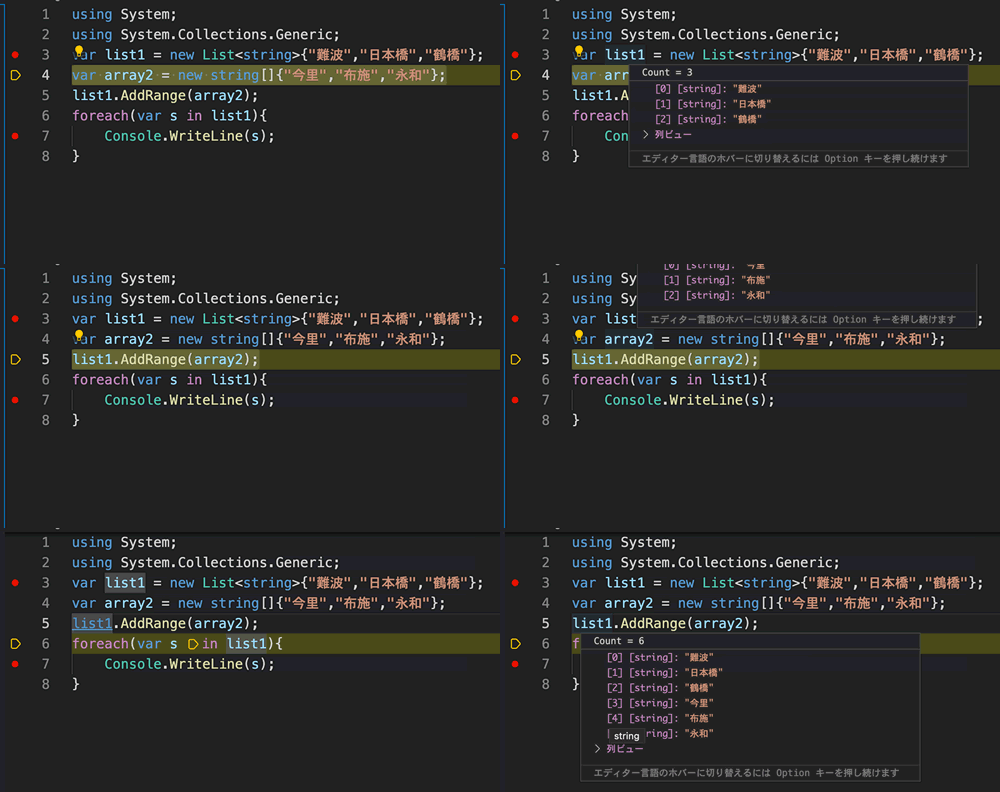
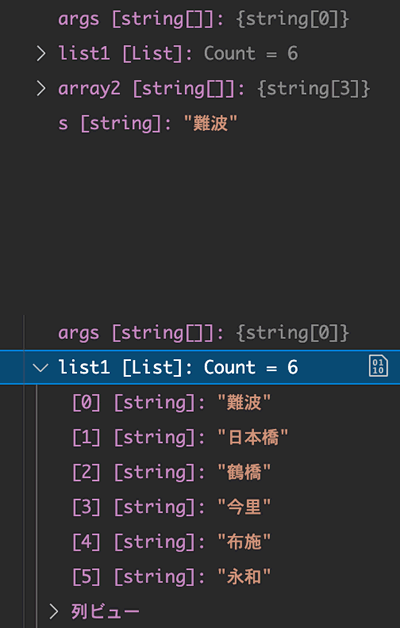
上記コードは、List<T>内に AddRange()の 引数に 連結させたいcollection を渡しています。

変数 list1に list2が連結してることが確認できます。

AddRange()の引数は、 IEnumerable<T>なので、 string[] 配列を渡すこともできます。

using System;
using System.Collections.Generic;
var list1 = new List<string>{"難波","日本橋","鶴橋"};
var array2 = new string[] {"今里","布施","永和"}; //string配列
list1.AddRange(array2);
foreach(var s in list1){
    Console.WriteLine(s);
}

Enumerable.Concat()を使ったList連結

using System;
using System.Collections.Generic;
var list1 = new List<string>{"難波","日本橋","鶴橋"};
var newList = list1.Concat(new string[]{"今里","布施","永和"}).ToList();
foreach(var s in newList){
    Console.WriteLine(s);
}

dotnet 6.0 macOS DynamoDBテーブル Describe取得

dotnet 6.0 macOS DynamoDBテーブル Describe取得

.NET6 C#を使って、 DynamoDB テーブルの詳細情報を取得します。

dotnet new console の後、 nugetからAWSSDK.DynamoDBv2パッケージをAddします。

dotnet add package AWSSDK.DynamoDBv2 --version 3.7.3.26

パッケージ内のDescribeTableAsync()を使えば、 テーブルの詳細情報を取り出せます。

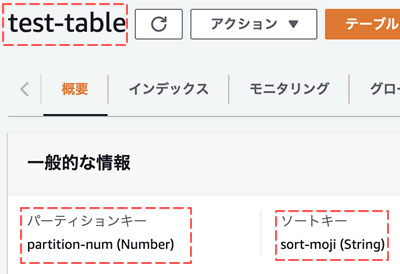
DynamoDB上に「test-table」テーブルを作成

DynamoDB テーブル作成

パーティションキー = partition-num
ソートキー = sort-moji

このDynamoDBで作成したテーブルの詳細情報を.NET6 C#を使って取り出します

using Amazon;
using Amazon.DynamoDBv2;

var dynamodb = new AmazonDynamoDBClient("アクセスキー","シークレット", RegionEndpoint.APNortheast1);
try{
    var describeTask = dynamodb.DescribeTableAsync("test-table");
    var describe = describeTask.Result;
    Console.WriteLine("テーブルARN={0}",describe.Table.TableArn);
    foreach (var att in describe.Table.AttributeDefinitions){
        Console.WriteLine("AttributeDefinition KeyName={0} Type={1}",att.AttributeName,att.AttributeType.Value);            
    }
    Console.WriteLine("テーブル作成日={0}", describe.Table.CreationDateTime.ToString());
    Console.WriteLine("総レコード={0}", describe.Table.ItemCount);
    Console.WriteLine("TableSizeBytes={0}", describe.Table.TableSizeBytes);
} catch(Exception _e){
    Console.WriteLine(_e);
}

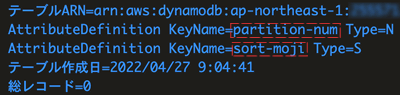
実行結果

テーブルの、 作成日・総レコード数・テーブルの サイズなども取得できています