Swift 文字列中に特定の文字があるか(contains)

string contains

文字列(String)の中に特定の文字があるかを判定する場合containsを使います

let s:String = "mjeld.com"
let judg:Bool = s.contains(".com")

上のコードのように「.com」があればtrueを返します

文字列が配列の場合も使えます。

let slist:[String] = ["mjeld","mojeld","mohri"]
let judg:Bool = slist.contains("mojeld")

配列の中に特定の文字列があるかを判定できます

どうやらArrayextensionで、contains()があったので文字列以外も使えそうでした

Swift URL to String変換

Swift URL 文字列変換

SwiftURLを文字列変換する方法

URLはstructなので文字列は中に入っています。下記はURL作成例です

let _s = "https://mjeld.com"
let _url: URL = URL(string: _s)!

URLがブラウザなどのURL文字列が入っている場合relativeString(相対)取得できます

let _urlString: String = _url.relativeString
print(_urlString)

文字列変換する場合は、absoluteString(絶対)も利用できます

let _urlString: String = _url.absoluteString
print(_urlString)

Swiftで文字列をURLへ変換する

変換と書いていますが 実際にはURLのinit?(string: String)に突っ込んでるだけです

let _s = "https://mjeld.com"
let _url: URL = URL(string: _s)!

ファイルの場合下記のような書き方ができます

let _s = "/home/"
let _url:URL = URL(fileURLWithPath: _s)

この場合absoluteStringすると”file://“がつきます。relativeStringでも同じでした

Swift ランダムのパスワードを生成

Swift password generator

Swiftで特定の文字列からランダムにパスワード作る方法

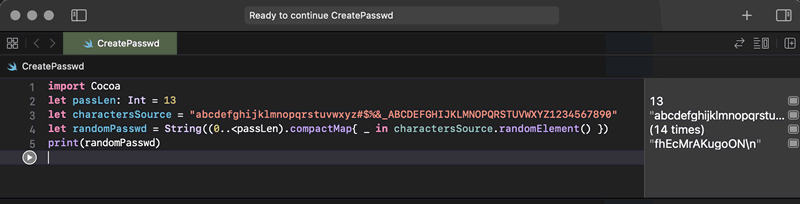
let passLen: Int = 13
let charactersSource:String = "abcdefghijklmnopqrstuvwxyz#$%&_ABCDEFGHIJKLMNOPQRSTUVWXYZ1234567890"
let randomPasswd = String((0..<passLen).compactMap{ _ in charactersSource.randomElement() })
print(randomPasswd)

charactersSourceの中からランダムで、passLen:Int桁分文字を取り出します

qF7ahwAQkYhcG」このような文字がrandomPasswdに入ります